Chapter 2: Setting Up Your Meesho Seller Account (Documents, GST & KYC Explained)


Chapter Objective
This chapter removes all confusion around documentation, GST, KYC, and account setup. By the end of this chapter, you will know exactly what is required, what is optional, and what mistakes to avoid while creating your Meesho seller account.
✅ What You Will Learn
- Complete list of documents required to start selling on Meesho
- Difference between Individual Seller vs Business Seller
- Whether GST is required or not (rules explained clearly)
- How to set up Bank Account & KYC correctly
- Step-by-step Meesho seller account creation process
- Overview of Meesho Seller Dashboard
- Common registration mistakes that cause account rejection or delay
📚 Topics Covered
- Creating a Meesho seller account
- PAN, Aadhaar & Bank account linking
- GST exemption rules for small sellers
- Seller dashboard walkthrough
- Practical registration checklist
🎯 Practical Task
✔ Create and verify your Meesho Seller Account successfully
2.1 Who Can Sell on Meesho? (Eligibility Explained)
Meesho allows any Indian citizen to start selling online, even with:
- Zero prior business experience
- Low or no investment
- No physical shop
You can sell as:
- Individual Seller
- Business Entity
Let’s understand both.
2.2 Individual Seller vs Business Seller
🔹 Individual Seller
Best for beginners, students, homemakers, or first-time entrepreneurs.
Features:
- Sell using your personal PAN
- Simple documentation
- Low compliance
- Can start without GST (under conditions)
Recommended if:
✔ You are just starting
✔ Low turnover initially
✔ Want minimum legal complexity
🔹 Business Seller
Includes:
- Proprietorship
- Partnership
- LLP
- Private Limited Company
Features:
- Business PAN & bank account
- GST usually required
- Suitable for scaling and bulk sales
Recommended if:
✔ You already have a registered business
✔ Plan high-volume selling
✔ Want stronger brand credibility
👉 Dhanshika Exports Tip:
Most beginners should start as Individual Sellers, then convert to business later.
2.3 Documents Required to Start Selling on Meesho
✅ Mandatory Documents
You cannot skip these:
- PAN Card
- Personal PAN (for individuals)
- Business PAN (for companies)
- Aadhaar Card
- Used for identity & KYC verification
- Active Mobile Number
- OTP verification
- Linked to seller account
- Email ID
- Business communication
- Order & payment alerts
- Bank Account
- Account holder name must match PAN
- IFSC code required
🧾 GST – Required or Not? (Very Important)
This is the most confusing part for new sellers — let’s simplify.
2.4 Is GST Required to Sell on Meesho?
🔹 GST is NOT mandatory if:
✔ You sell within your state only
✔ Your turnover is below ₹40 lakhs (₹20 lakhs in some states)
✔ You sell in GST-exempt categories
In this case, Meesho allows:
- GST Enrollment ID / UIN
- Limited category access
🔹 GST IS required if:
✔ You sell inter-state
✔ You want access to all categories
✔ Your turnover crosses threshold
✔ You want long-term scaling
👉 Official GST Portal:
🔗 https://www.gst.gov.in
👉 Legal Explanation (Vakilsearch):
🔗 https://vakilsearch.com/advice/gst-for-online-sellers/
⚠️ Important Reality Check
- Non-GST sellers face category and growth limitations
- GST sellers build more trust and scalability
👉 Dhanshika Exports Recommendation:
Start without GST if needed — but plan to register within 3–6 months.
2.5 Bank Account & KYC Setup (Critical Step)
🏦 Bank Account Requirements
- Indian bank account only
- Account holder name must match PAN
- Savings or current account allowed
🧍 KYC Verification
- PAN verification
- Aadhaar verification
- Bank verification
⚠️ Mismatch in name = payment hold or rejection
2.6 Step-by-Step: Creating Your Meesho Seller Account
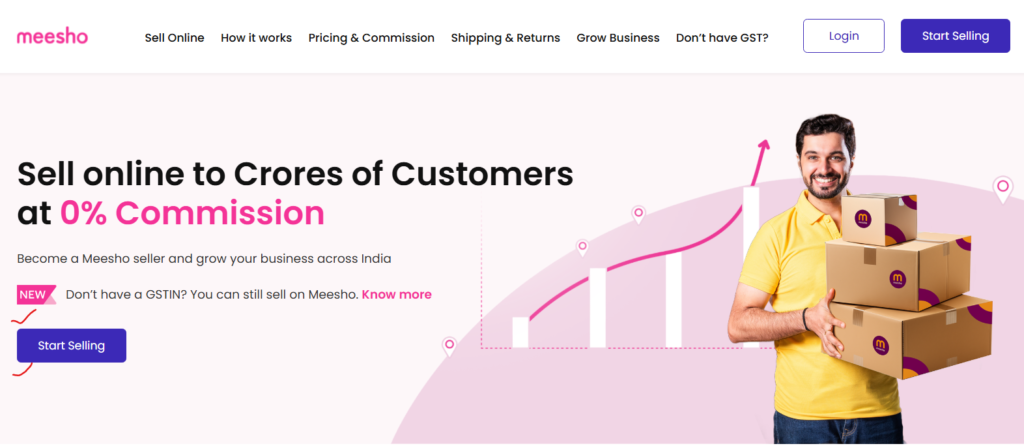
Step 1: Visit Official Meesho Seller Portal
Click “Start Selling”
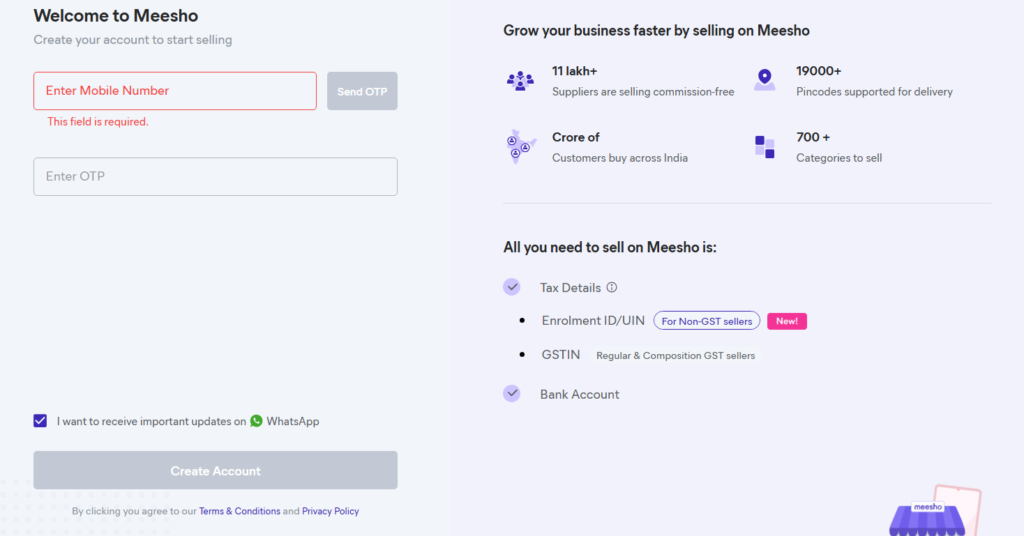
Step 2: Mobile Number Verification
- Enter mobile number
- Verify via OTP
Step 3: Enter Basic Business Details
- Seller type (Individual / Business)
- Email ID
- Store name
💡 Choose a simple, brand-friendly store name
Step 4: Tax & Identity Details
- PAN number
- GSTIN OR Enrollment ID
Step 5: Bank Account Linking
- Account number
- IFSC code
- Account holder name
Step 6: Pickup Address
- Correct PIN code
- Proper landmark
- Address where courier can pick up products
Step 7: Submit & Wait for Approval
- Verification usually takes 24–72 hours
- Errors may delay approval
2.7 Meesho Seller Dashboard Overview
Once approved, you’ll access:
- 📦 Product listing section
- 📊 Orders & returns
- 💰 Payments & settlements
- 📈 Performance analytics
- ⚙️ Account settings
This dashboard is your control center.
2.8 Common Registration Mistakes (Avoid These)
🚫 Wrong PAN or GST number
🚫 Bank name mismatch
🚫 Incorrect pickup address
🚫 Using inactive mobile/email
🚫 Rushing GST decision without understanding
These mistakes cause:
❌ Account rejection
❌ Payment delays
❌ Listing restrictions
2.9 How Dhanshika Exports Helps You
With Dhanshika Exports, you get:
✔ Clear GST vs non-GST guidance
✔ Document checklist support
✔ Store naming & category guidance
✔ Supplier-ready onboarding
✔ Long-term scaling roadmap
We help you start right — not start again.
📝 Practical Task (Must Complete)
✔ Visit Meesho seller portal
✔ Create your seller account
✔ Verify mobile, email, PAN & bank
✔ Take screenshots of each completed step
✔ Note down approval status
👉 Completion Goal:
You should have a verified Meesho seller account ready for product listing.
